Documentation
Industrial remote maintenance: no gateway box, no open ports
Fixing a machine installed at a customer's site, without travelling and without touching their firewall: that is what industrial remote maintenance is about. The market answers with hardware boxes wired to a vendor cloud. VIGIL-MESH replaces the box with a software agent — on the machine itself or on a site gateway — and puts your equipment on a real private network: zero inbound ports, end-to-end encryption, access controlled machine by machine.
Remote machine access: three recurring situations
Remote maintenance is not a nice-to-have: it is what separates a one-hour intervention from a two-day trip. Three situations come up everywhere machines leave their builder's workshop.
The machine delivered to a customer
The machine builder has to diagnose, patch, update — on a site it does not control, behind a network and a firewall that are not its own.
The multi-site fleet
An integrator or operator follows dozens of sites. Each site has its own carrier, router and policy: negotiating a bespoke VPN per site does not scale.
The expert you cannot teleport
The automation engineer who knows the machine is hundreds of kilometres away. They need the HMI, the logs, a program download — now, not next week.
In all three cases the question is not “how to get access” — the market has known how for years — but “with what”: one more hardware box in the cabinet, or a software agent on a machine that is already there.
Remote maintenance gateways: the classic approach
The market standard is the hardware remote-access gateway: Ewon Cosy (HMS Networks), IXON, Tosibox, Secomea, Teltonika. The principle is proven — a VPN box sits in the machine cabinet, dials out to the vendor's cloud, and the technician connects to that cloud through the vendor's portal or client to reach the machine. It works, and it has served a whole industry well.
- One box per machine or per site: to buy, wire, configure and maintain — the hardware and logistics cost grows with the fleet.
- The vendor's cloud sits on the path: it is what brokers the connection between technician and box, under the terms and pricing of the offer.
- Access is often screen-centric: depending on the offer, you reach the HMI display or a few predefined ports, more rarely a full network.
- A genuine hardware advantage: some models embed a 4G router and bring their own connectivity to the site.
Remote maintenance without a box: how it works
A software agent replaces the box. It installs either directly on the machine when it embeds a PC (Windows or Linux — HMI or supervision station), or on a site gateway: industrial PC, NVIDIA Jetson, Linux box. Android is covered for mobile workstations, and the browser itself can become a node of the network (WASM) to intervene without installing anything.
The agent opens no inbound port: it only makes outbound connections, and traverses NAT, CGNAT and 4G/5G links. When no direct path can be established between two peers, traffic goes through relays — the vigies — which are structurally blind: they do not hold the keys and never see the content. Every session is encrypted end to end with QUIC/TLS 1.3, on Ed25519 keys, with hybrid post-quantum key establishment.
Connecting a machine comes down to a single-use enrollment key, generated from the console:

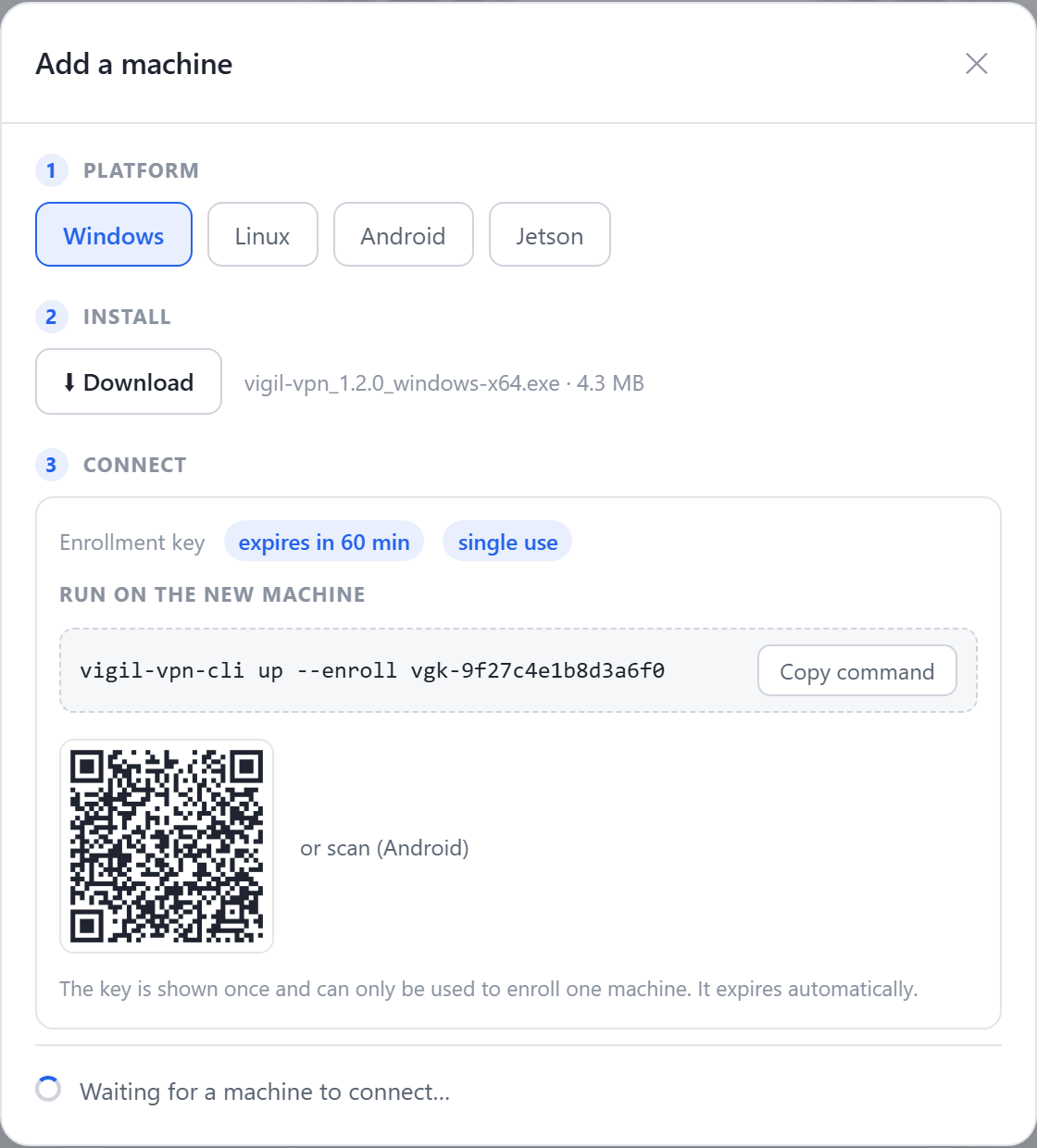
- Pick the platform of the machine or site gateway — Windows, Linux, Android, Jetson.
- The enrollment key is single-use and expires on its own: it authorises exactly one join.
- The command to run on site, key included — one line, copied as is.
- The assistant waits: as soon as the machine connects, it shows up here, ready for E2EE verification.
Once verified, the machine gets a stable overlay address and a MagicDNS name; ACLs then decide who may reach it, service by service.
A real LAN, not just a screen tunnel
A remote-access box primarily gives you a way in. A VIGIL-MESH agent puts the machine on your network: everything that speaks IP just works, as if your workstation and the machine were plugged into the same switch.
Monitoring and HMI
The web HMI, the OPC UA server or the historian are reachable at their overlay address, from your usual tools.
File transfer
Programs, recipes, logs: SFTP, SMB or rsync straight to the machine, with no intermediate platform.
SSH terminal in the browser
The console opens an SSH terminal on any online machine, right in the browser — see the Administration tab.
Real time and discovery
Broadcast and multicast cross the mesh: mDNS, SSDP, DDS/ROS 2 — your tools discover devices as if they were local.
Remote serial port (beta)
The RS-232/USB-serial port of a remote machine mounts as /dev/ttyVIGIL (Linux) or as a virtual COM port (Windows — beta driver not yet production-signed, requires a test machine today) or /dev/ttyVIGIL (Linux) — see remote serial port.
MagicDNS and ACLs
Every machine carries a stable name; every flow is authorised by identity, on a least-privilege basis.

- The site machine, as it appears in the network inventory.
- Its overlay address: that is what the terminal reaches — never a public address.
- “Terminal” opens an SSH session in the browser, encrypted end to end all the way to the machine.
Machine at a customer site, locked-down firewall: the typical scenario
The most common case — and the most frustrating: your machine is in production at a customer's plant, and everything between it and you belongs to their IT.
The machine needs an intervention: diagnosis, a patch, a recipe update. Between it and you sits the customer's network — locked down, for good reasons.
- The customer's IT will not open an inbound port, and rightly so: every forwarding rule is a permanent attack surface on their network.
- Getting a VPN account on the customer's network takes weeks, engages their liability, and often gives you more visibility into their infrastructure than anyone wants.
- Some sites only have a 4G link or CGNAT access: there is no public address to reach, even if everyone agreed.
- Every customer has its own policy: at fleet scale, network negotiation becomes a job of its own.
- 1Install the agent on siteOn the machine if it embeds a PC; otherwise on a site gateway — industrial PC, Jetson, Linux box — often a machine already there for the HMI or supervision.
- 2Enroll it with a single-use keyFrom the console, the “Add a machine” assistant hands you a key that expires on its own. One command on the machine, and it joins your network.
- 3Ask nothing of the customer's ITThe agent only makes outbound connections: no port to open, no NAT rule, no DMZ. It traverses firewalls, CGNAT and 4G.
- 4Write the access ruleA least-privilege ACL: your service team may reach this machine, on the intended services — nothing else. The rest of the customer's network is never visible.
- 5Intervene, then leave a trailMonitoring, file transfer, SSH terminal from the console. The intervention is logged; at the end of the contract, revocation cuts access immediately.
When a hardware box remains the right call
Honesty first: the agent is software, so it needs an operating system. VIGIL-MESH installs on Windows, Linux (desktop or server), Android and NVIDIA Jetson — not inside a PLC.
- No OS on the machine and no PC on site: if the cabinet holds nothing but a bare PLC and no gateway can be added, a hardware box remains the straightforward path.
- A built-in 4G router is required: some boxes embed their own modem — useful when the site has no connectivity to share.
- In every other case — an HMI PC, a supervision station, a possible Linux gateway — the agent is enough, and it brings the full network on top of the access.
Security: end-to-end encryption, ACLs and audit
- Zero inbound ports, everywhere: neither on site nor on your side. All connectivity is outbound.
- End-to-end encryption: QUIC/TLS 1.3, Ed25519 keys, hybrid post-quantum key establishment. The relays (vigies) do not hold the keys and only see opaque packets.
- Identity-based ACLs, deny by default: every flow is explicitly authorised — machine, group, service. See policies and ACLs.
- Web console: machine inventory, real-time topology, SSH terminal, audit log, per-member roles.
- Immediate revocation: end of contract or lost laptop, access drops in one action — direct flows and broadcasts included.
Frequently asked questions
Do we need to open a port on the customer's firewall?
Can we keep the boxes already installed during the transition?
Does the agent install inside the PLC?
Who can see the content of my remote maintenance sessions?
How much does remote maintenance with VIGIL-MESH cost?
The same network that connects them lets each software announce its capabilities — and an MCP assistant see and operate them, under your control, machine by machine.
Read nextRemote PLC access →