Documentation
An IXON alternative: OEM remote access over a private network, without a dedicated router
For a machine builder, remote access is not a comfort: it is the promise made to the customer at the sale — a service team that sees the machine within minutes, wherever it is installed. IXON built its offer around that promise: a router in the cabinet, a cloud platform, a web portal for the service team. VIGIL-MESH answers the same need by another route: a software agent on a machine of the machine network — the HMI's industrial PC, a Linux gateway — and an end-to-end encrypted private network where your technicians reach every machine by name, with no dedicated router and no inbound port. This page compares the two models honestly, then walks through the migration from the OEM side.
What IXON does very well
IXON Cloud is a platform designed from the start for machine builders: an industrial router (IXrouter) in the cabinet, establishing an outbound connection to the vendor's cloud, and a web portal where the service team finds its fleet, opens VPN access to a machine or reaches the HMI over VNC or HTTP from the browser. Depending on the plan, the platform adds services on top of access: data logging, dashboards, alerts. It is a coherent, polished proposition, tailored for OEMs.
A turnkey portal for the service team
The technician opens a browser, finds the fleet sorted by customer, and reaches the machine in a few clicks. To get a service team productive fast, the portal experience is hard to beat.
Built for machine builders
Multi-customer fleets, per-organization access management, OEM branding depending on the plan: the platform mirrors the builder → end-customer relationship.
Nothing to ask of the customer's IT
The router goes outbound to the vendor's cloud: no inbound port, no port forwarding to negotiate with the site's IT department.
- A machine without an OS and no PC on the machine network. The VIGIL-MESH agent is software: it needs an operating system. If the machine network contains only a bare PLC and no Linux or Windows machine can be added to it, the dedicated router remains the natural solution.
- The need for a 4G router integrated into the box. On a site without wired internet, a box that also brings cellular connectivity provides two services in one. VIGIL-MESH does not provide connectivity: it travels over it.
- An end-customer policy that mandates hardware. Some clients require a physical remote-access device, identified on the electrical drawing. That is their right, and a software agent does not answer it.
The router + platform model, and what it implies
The IXON model is openly stated and documented: hardware in the cabinet, the platform in the vendor's cloud, subscriptions depending on services. It works — and it shapes choices worth knowing before committing an entire fleet.
- One router per delivered machine. Hardware is bought, provisioned, kept as spares and replaced. On machines that already ship with an industrial PC, the box duplicates existing hardware.
- Access and the fleet live in the vendor’s cloud. The portal is the mandatory path: VPN, VNC or HTTP access is established through the vendor’s infrastructure, which brings the ends together. For that service’s exact guarantees — availability, traffic handling — its documentation is the authority.
- Access rights are platform data. Who reaches which machine is managed in the vendor’s portal, according to its organization and licence model. That is coherent — but it is not a rule of your network.
- Access remains machine by machine. The portal opens access to one machine at a time. The fleet is not a network you walk through with your usual tools: it is a catalogue of accesses.
The VIGIL-MESH approach: a network of your own, not a third-party portal
VIGIL-MESH replaces the router with a software agent — Windows, Linux, Android, NVIDIA Jetson, plus a browser node (WASM). Installed on a machine of the machine network, the agent turns it into a site gateway: a single outbound connection to your private network, zero inbound ports, and authorized flows relayed to the PLC and the HMI — which do not change. The full setup is described in Remote access to a PLC, and the broader picture in Industrial remote maintenance.
The fleet becomes a real LAN
Every site gateway and every service workstation is a member of the same private network: stable address, readable MagicDNS name (press-lyon, oven-nantes), discovery and multicast between members. Your usual tools — VNC client, browser to the HMI, engineering tool — reach the machine by name.
End-to-end encrypted, blind relays
End-to-end encrypted QUIC/TLS 1.3 sessions, hybrid post-quantum key exchange. When a relay is needed, the vigie carries opaque packets without holding the keys — and the private vigie can be self-hosted, at your site or the end customer’s.
One network per customer, identity ACLs
One VIGIL-MESH network per end customer, ACLs with deny by default: the service group reaches its customers' gateways on the useful ports, each customer only sees their machines. Every access audited, MFA on accounts, immediate revocation.
SSH terminal in the browser
The console opens an SSH terminal on a gateway right in the page — the browser becomes a mesh node, and credentials never transit our servers. Handy on the road, on a clean workstation.
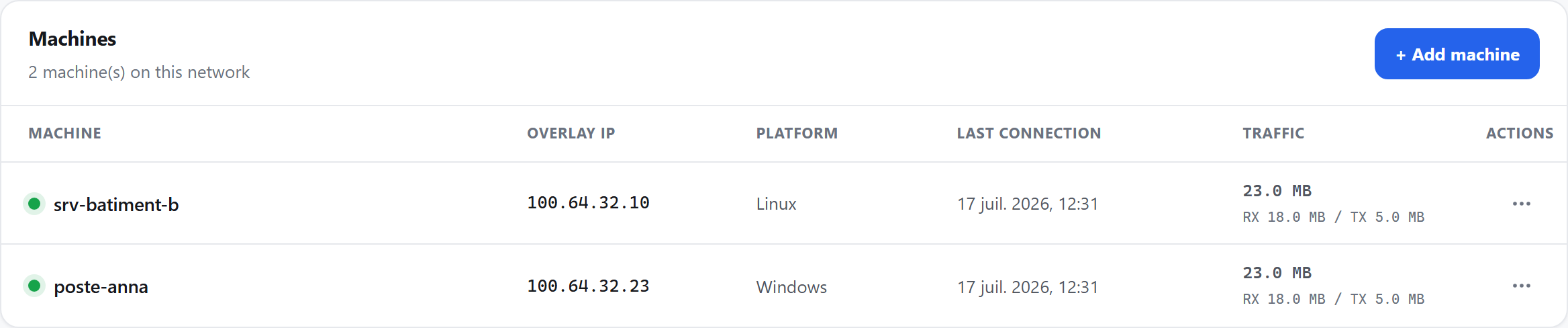
- The machine's gateway, online: this is what the service team reaches by name.
- Its stable overlay address — the same wherever the machine is installed, even after a site move.
- Suspend or revoke: cutting off a machine or a technician is immediate.
Qualitative comparison
| Criterion | IXON Cloud + IXrouter | VIGIL-MESH |
|---|---|---|
| Hardware required | A dedicated router per machine, to buy and maintain | No box: a software agent on a Windows/Linux machine of the machine network (industrial PC, Jetson, Linux box) — often already shipped with the machine |
| Network model | On-demand access to one router at a time, through the vendor's portal and cloud | A permanent, real mesh LAN: gateways and service workstations are members of the same private network, reachable by name |
| Multicast / discovery | Routed tunnel: automatic multicast discovery generally does not cross it | Real-LAN multicast and discovery between mesh members (mDNS, discovery protocols) |
| Serial port | Depends on the router's interfaces and the chosen model | Virtual-IO remote serial — in beta |
| Real-time UDP / video | Flows carried through the vendor's infrastructure, depending on the access type | End-to-end UDP, direct peer-to-peer path as soon as NAT traversal succeeds, seamless migration |
| Browser SSH terminal | Depends on the vendor portal's services | Yes: SSH client running in the page, credentials never sent to our servers |
| Cloud trust model | Access is established through the vendor's infrastructure, which brings the ends together — its documentation is the authority on exact guarantees | Structurally blind relays: E2E QUIC/TLS 1.3 + hybrid post-quantum sessions, the relay never holds the keys |
| Self-hosting the relay | The service relies on the vendor's cloud | Yes: self-hostable private vigie — the relayed path goes through a machine of yours |
Migrating: the machine-builder scenario
The typical case: an OEM shipping machines with built-in remote access to dozens of end customers, with a service team that lives in the portal.
Every machine ships with its router, every customer has its organization in the portal, and the service team has its habits. Then the fleet grows, and frictions settle in:
- A router to buy and provision per delivered machine — while the machine already ships with an industrial PC driving the HMI.
- Subscriptions and rights managed in the vendor's platform, per organization and per user, to reconcile with your own team management.
- End-customer IT departments asking where the access flows transit and who terminates them — and the answer belongs to the vendor, not to you.
- Catalogue access, machine by machine: to work on the fleet as on a network — supervision, scripts, comparisons between lines — the portal is not the right tool.
Here again, the starting observation is simple: the industrial PC already in the cabinet can become the gateway — with no extra box.
- 1Choose each machine's gatewayThe HMI's industrial PC (Windows), a Linux gateway, a Jetson: any machine with an OS that sees the machine network will do. If there is none, add a small Linux machine — or keep the router on that machine.
- 2Structure the workspace per end customerOne VIGIL-MESH network per end customer: fleets stay sealed, your technicians see what their rights allow, each customer only sees their machines. It is the network equivalent of your portal organizations.
- 3Enroll the gatewayConsole → Networks → Machines → “Add a machine”: one-time enrollment key, identity generated on the machine, no port opened — a single outbound flow on 443 UDP, including behind the customer's firewall.
- 4Declare the equipment and write the ACLsThe PLC and the HMI are declared host by host behind the gateway. ACLs with deny by default: the service group reaches its customers' gateways on the useful ports (HMI VNC, PLC port, SSH) — nothing else.
- 5Replay the service team's movesThe technician's VNC client to the HMI by its address, a browser to the machine's web server, the browser SSH terminal to the gateway, the engineering tool to the PLC: every portal move has its equivalent — inside your network, end-to-end encrypted.
- 6Switch over machine by machineThe router stays in place during validation; the two accesses coexist without conflict. Remove the box machine by machine, at the pace of visits — and keep the vendor's platform where its data services still serve you.
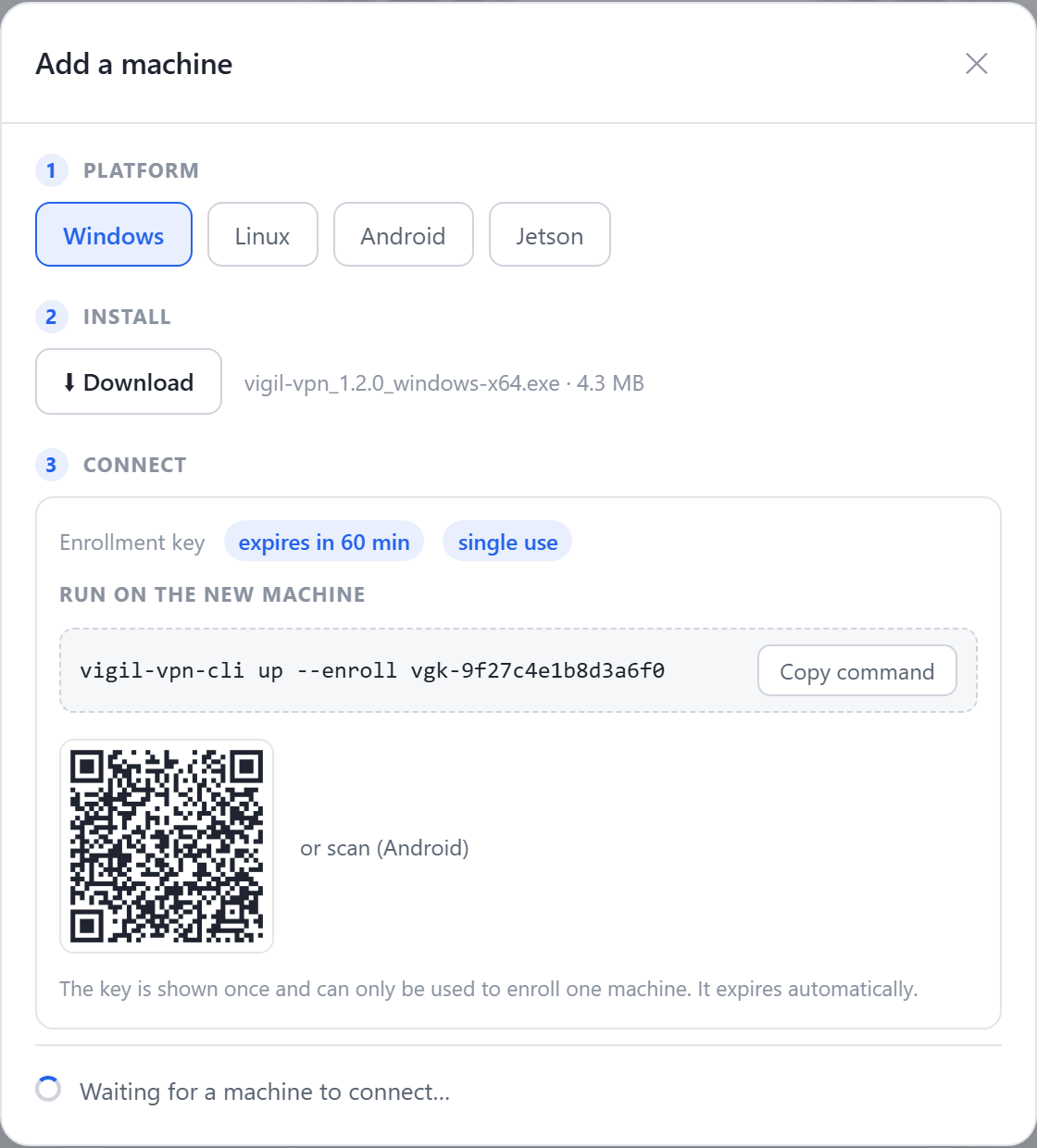
- The gateway's platform: Windows for the HMI's industrial PC, Linux for a site box or a Jetson.
- The enrollment command to run on the gateway — the key is single-use and expires on its own.
- As soon as the agent connects (outbound), the machine appears in the customer network's inventory.
Frequently asked questions
Can we keep the existing IXON routers during the migration?
Will the service team still reach the HMI over VNC or HTTP?
What about dashboards and machine data logging?
Does every end customer need an account with you?
What if the machine has no PC on its network at all?
The same network that connects them lets each software announce its capabilities — and an MCP assistant see and operate them, under your control, machine by machine.
Read nextIndustrial remote maintenance →