Documentation
A Teltonika RMS alternative: the 4G router keeps the link, the agent takes over access
Teltonika cellular routers are everywhere in the field, for good reasons: rugged, well-equipped, they bring Internet to sites that would not have it otherwise. The vendor's RMS platform manages that router fleet and offers, with RMS Connect, remote access to the equipment living behind it. This page argues one simple idea: keep the router — it is often the best Internet link for the site — but hand the remote-access role to an agent that builds a real private network, encrypted end to end, with no inbound port and no cloud in the middle of the sessions. The two combine very well.
What Teltonika does very well
The model, described at a high level: cellular routers and gateways (the RUT range and its siblings) installed on sites, a cloud platform (RMS) that manages the fleet — configuration, updates, monitoring —, and a remote-access service (RMS Connect) that opens sessions to the equipment behind the routers, often from the browser. The whole is coherent: the network hardware and its management come from the same vendor.
Proven network hardware
Bringing 4G/5G to a remote site, living in an electrical cabinet, failing over between SIMs: that is what these routers do, and they do it well. Nothing on this page suggests replacing them.
Centralized fleet management
Firmware, configuration and monitoring of hundreds of routers from one console: for whoever operates the network fleet, that is real operational comfort.
Built-in remote access
RMS Connect opens sessions to equipment behind the routers without inbound ports on the site side — the router dials out to the platform, and the session goes through it.
Two roles to separate: the Internet link and remote access
A 4G router provides two very different services when it is also given remote maintenance: it carries the site's packets (its trade), and it decides who gets in and to what (a security trade). Merging the two into the router + cloud pair has consequences worth weighing:
- Access is coupled to the network hardware. Remote-access rights live in the platform that manages the routers: changing routers, product lines or vendors also means moving your access model.
- Sessions go through the vendor’s cloud. Brokering — and carrying the session — are operated by the platform. Convenient, but access to your machines depends on an external service, and trust rests on it.
- Access happens service by service. You open a session to a declared device and service — fine for one-off troubleshooting, narrower than a real local network when vendor tools want to discover their equipment or push real-time flows.
The VIGIL-MESH approach: a private network over any link
VIGIL-MESH does not touch the Internet link: the agent installs on the site's machines — the supervision PC, the IPC, a Linux gateway, a Jetson — and brings them into your private network. Every machine only establishes outbound connections, on a single 443 UDP flow: behind a 4G router under CGNAT, that is exactly the traffic that passes with zero configuration. Sessions are encrypted end to end (QUIC/TLS 1.3, hybrid post-quantum key exchange); the path is direct peer-to-peer when NAT traversal succeeds, relayed by a structurally blind vigie otherwise.
A real LAN across sites
Stable addresses, MagicDNS names, multicast and automatic discovery: machines see each other as on a local network, whatever the link — 4G, fiber, satellite.
Identity instead of hardware
Who reaches what no longer depends on the router in the path: the ACLs speak of identities — machines, groups, tags — with default deny, machine by machine and port by port.
Usable traces
Sensitive operations require MFA and feed the audit log: who connected, when, to which machine — by identity, not by router IP address.
Nobody in the middle of the sessions
Vigies relay encrypted packets they hold no keys for, and a private vigie can be self-hosted. The details are in the security model.

- The machine name, as it appears in the network inventory.
- Its overlay address: this is what the terminal reaches, never a public address.
- “Terminal” opens an SSH session encrypted end to end — the tab becomes a mesh node.
Qualitative comparison
This table compares the remote-access role of the two models, at a high level — not datasheets. The router's Internet-link role is not in question: it keeps it.
| Criterion | Teltonika RMS | VIGIL-MESH |
|---|---|---|
| Hardware required | Vendor router or gateway (often already present as the site's 4G link) | No dedicated hardware: an agent on a site PC or gateway — the router keeps its link role |
| Network model | Routers dial the cloud platform; remote-access sessions go through it | Encrypted private network between machines: direct peer-to-peer when possible, blind relay otherwise |
| Multicast and discovery | Per-service sessions, point to point | Real LAN: native multicast, broadcast and automatic discovery, MagicDNS names |
| Serial port | Available on some devices, depending on model | Virtual-IO (virtual serial port) — in beta |
| Real-time UDP and video | Service-oriented access sessions, through the platform | End-to-end UDP flows; on the direct path, no intermediate termination |
| Browser SSH terminal | Yes, through the cloud platform | Yes: the tab becomes a mesh node — credentials are consumed in the page, never by our servers |
| Cloud trust model | The platform operates fleet management and session brokering | Controller for identity and policy; structurally blind relays, without the session keys |
| Self-hosting the relay | Platform operated by the vendor | Self-hostable private vigie, dedicated to your workspace |
The duo that works: RUT router for 4G, agent for access
In the field, the combination is natural: the cellular router provides the site's Internet link — coverage, SIM failover, link monitoring through RMS if you wish — and the VIGIL-MESH agent, installed on the gateway or the machines behind it, builds the private network. The agent asks nothing of the router: no inbound port, no forwarding, no DMZ — only outbound 443 UDP traffic, which every cellular router passes by default.
A remote site — station, construction site, cabinet, delivered machine — is connected over 4G. You need to work on it remotely, regularly, with several people:
- The 4G link is under CGNAT: nothing can be exposed inbound, and that is fine.
- Remote access through the router's cloud works, but every session depends on an external service — and internal policy increasingly demands that nobody can technically see the sessions.
- Rights live at the router and platform level, not at the level of people and machines: hard to write “this contractor reaches only this PLC, on this port”.
- Business tools — supervision, vendor discovery, video or real-time UDP flows — want a network, not a per-service session.
- 1Keep the router as it isThe cellular router stays the site's Internet link — no port forwarding, no DMZ, no access configuration on it. If RMS manages its firmware and link monitoring, nothing changes.
- 2Install the agent behind the routerThe site's gateway or industrial PC (Windows or Linux — or a Jetson) receives the VIGIL-MESH agent. Devices without an OS are reached through that machine, declared machine by machine.
- 3Enroll with a single-use keyThe “Add a machine” wizard hands out a key that expires on its own; the machine generates its identity locally, dials out over 443 UDP and opens no inbound port.
- 4Write least-privilege ACLsDefault deny, identity-based rules: each person reaches only their machines, port by port — see the access policies.
- 5Work, trace, revokeSSH terminal from the browser or client on the workstation; MFA on sensitive operations, every access traced in the audit log, immediate revocation.
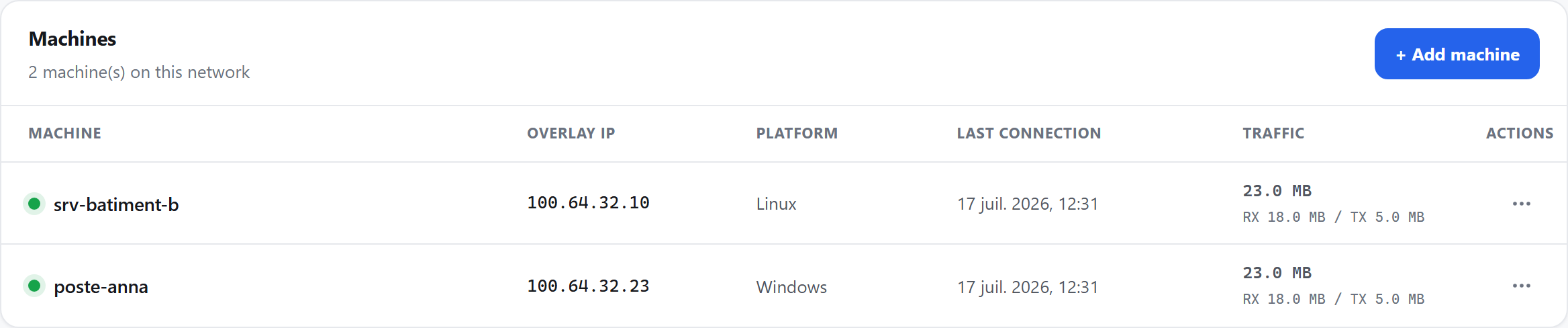
- The site gateway appears in the inventory; the green dot means it is online — behind 4G, with no inbound port.
- Its stable overlay address, independent of the cellular link's changing address.
- The actions menu: suspend, revoke or rename — immediate effect.
For the full picture of the use case — machine fleets, contractors, network zones — see Industrial remote maintenance.
Frequently asked questions
Do I need to replace the Teltonika router to use VIGIL-MESH?
Does it work behind a 4G/5G link under CGNAT?
How is this different from the router cloud's remote access?
How do I reach a PLC or sensor without an OS behind the router?
What about the price?
The same network that connects them lets each software announce its capabilities — and an MCP assistant see and operate them, under your control, machine by machine.
Read nextIndustrial remote maintenance →